
Bonny Chen


I’m Bonny, a UX Designer with a product design and smart systems background. I specialise in research and prototyping that merge AR/VR, hardware–software, and AI tools, creating solutions proven to improve usability and efficiency.
I’m Bonny, a UX Designer with a product design and smart systems background. I specialise in research and prototyping that merge AR/VR, hardware–software, and AI tools, creating solutions proven to improve usability and efficiency.

In cleanroom environments, strict identity verification is essential, yet password-based systems present both usability and security challenges. Wearing personal protective equipment (PPE) makes typing slow and error-prone, while passwords are also vulnerable to being observed or deliberately shared among engineers of different ranks, risking confidentiality breaches.
This study will address two research questions:
Research Question 1: How does AR-based authentication influence user acceptance in terms of perceived usefulness, ease of use, trust, attitude, and behavioural intention?
Research Question 2: How does the perceived trust level (high vs low) influence users’ acceptance of AR-based authentication compared to traditional password-based login?

To address these limitations, this study investigates Augmented Reality (AR) with iris recognition as an alternative. The Technology Acceptance Model highlights that perceived usefulness and ease of use are key to adoption (Davis, 1989), while the Trust-Enhanced TAM emphasises that trust plays a critical role in secure, high-stakes contexts (Dahlberg et al., 2003). Prior research further shows that AR can enhance presence and user acceptance in operational environments, suggesting its potential for secure authentication in industry (Slater & Wilbur, 1997; Krüger et al., 2019).
Two prototypes were created to compare traditional password-based authentication with an AR iris recognition system in cleanroom environments. The goal was to test whether AR could overcome usability issues with PPE and reduce risks of password misuse such as shoulder-surfing or credential sharing.

Password-based Prototype (Control Prototype)
The control prototype replicated a password login system inspired by the CAMD interface. It was deployed as a web prototype (Vercel + Manus), providing a realistic baseline for testing. While reflecting common industry practice, this design also highlighted the challenges of typing credentials while wearing gloves and masks.
AR-based Prototype (Treatment Prototype)
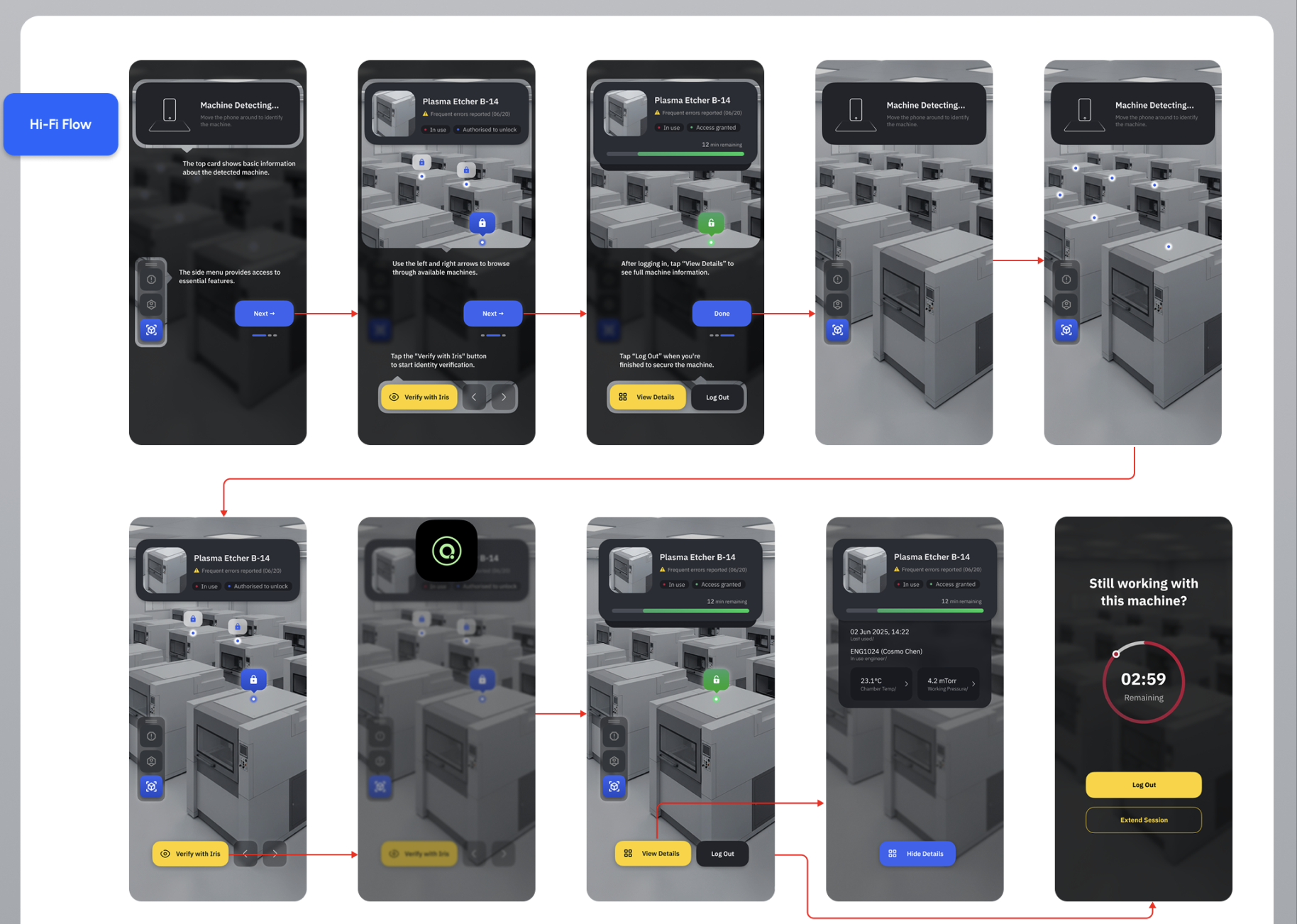
The AR prototype was developed using Unity and Vuforia, integrated with a Xcode for simulated access control. Its design followed cleanroom authentication guidelines, ensuring proper touch target size, contrast, feedback modalities, and ergonomic layout. A user flow diagram mapped the entire authentication journey — from machine detection to iris verification and session management. The final hi-fi mockups presented an AR interface with real-time machine overlays, iris-scan animation, and session feedback, delivering a password-free, streamlined authentication experience.


Testing Environment
The experimental setup simulated a cleanroom environment by arranging cardboard-mounted machine markers in two rows, replicating typical equipment positioning. Participants wore gloves to reflect the constraints of PPE usage, and both prototypes—the password-based control and AR iris-scan treatment—were tested within this setting. This arrangement allowed a controlled yet realistic evaluation of system interaction under conditions resembling actual cleanroom workflows.
Experimental Design
The study adopted a mixed-method design. Twenty participants tested both prototypes — a password-based control and an AR iris-scan treatment — in a counterbalanced order (AB/BA). To explore trust effects, participants were pre-screened into high- and low-trust groups. After each task, surveys captured user ratings, followed by semi-structured interviews for deeper insights (Braun & Clarke, 2006).

Measurement Framework
Evaluation combined objective metrics and subjective acceptance metrics. Performance was measured by task completion time and error rate. Subjective acceptance was captured through validated Likert-scale surveys: PEOU and PU (Davis, 1989), PT (Dahlberg et al., 2003; Martinović et al., 2024), and ATU and BITU (Venkatesh et al., 2003). This ensured both usability outcomes and acceptance factors were systematically assessed.
Quantitative Findings (Research Question 1)
The AR prototype significantly outperformed the password-based control in both task efficiency and acceptance ratings. Participants completed tasks faster and with fewer errors using AR. Survey results showed higher scores for Perceived Ease of Use (PEOU), Perceived Usefulness (PU), Attitude Toward Use (ATU), and Behavioural Intention to Use (BITU). In contrast, Perceived Trust (PT) showed no significant difference between AR and passwords, indicating usability was the main driver of adoption (Davis, 1989; Dahlberg et al., 2003).
Subgroup Analysis (Research Question 2)
When comparing high-trust and low-trust groups, both followed the same pattern: AR received higher ratings across PEOU, PU, ATU, and BITU, while PT remained stable. This suggests that baseline trust did not moderate acceptance, reinforcing that AR’s advantages are usability-driven rather than dependent on prior trust levels.

Qualitative Insights
Interview analysis supported the quantitative findings. Participants valued AR for being faster, more convenient, and less mentally demanding under Personal Protective Equipment (PPE) conditions. One participant noted, “Typing passwords with gloves was slow and frustrating, while AR felt effortless.” Others still associated passwords with reliability, but concerns about data transparency and privacy were raised regarding AR authentication.
Minimise manual interaction
Authentication flows should require only essential actions, such as single-step biometric verification triggered automatically when the device aligns with the user.
Ensure transparency and privacy
Designers should provide a privacy dashboard that shows how biometric data is used, stored, and shared, including retention periods and access logs.
Enhance clarity and accessibility
Interfaces must adopt high-contrast text (minimum 4.5:1), large touch targets (60+ points), and colour-coded status cues to support users in PPE-constrained environments.
Provide contextual guidance
Visual aids, such as arrows or overlays, should connect information to real-world equipment, guiding user attention efficiently during spatial AR interactions.
Address emotional and attitudinal factors
Since AR can either excite or unsettle users, onboarding should be benefit-focused and include optional dual login methods to ease transition and increase comfort.